Season 5 First Preview
Season 5 introduces a variety of new features, gameplay improvements, quality-of-life updates, and system enhancements. As this is an early preview, additional content is still planned and some features may be adjusted before release.
Please note that the following post is an early preview of content currently planned for Season 5.
- All of the changes listed below will be released when Season 5 begins and/or on the Test Server, which is expected to open approximately one month prior to the start of Season 5.
- This is only a partial preview of the content currently planned for Season 5. Additional changes and features will be announced at a later date.
- As development and testing continue, some of the changes listed below may be adjusted, rebalanced, or expanded before their final release.
- We expect to have official Season 5 release date options sometime this month, but we are expecting these dates (the release dates) to line-up somewhere around the July 24th or July 31st weeknds (the exact release dates would be polled).
Steam & Google Login Support
We've updated all of our registration and login interfaces to support both Steam and Google accounts. Players will now be able to register and log in using their Steam or Google account through the Eonic Games Launcher, Turf Battles servers, and our websites.
Progress Toward Steam Release
As you may have guessed from the announcement above, we are actively working through the remaining requirements needed to bring Turf Battles to Steam. Implementing Steam-based login and registration across all of our platforms was a major milestone in this process and one of the most significant steps toward Steam release. While this work is now largely complete, there are still additional requirements that must be satisfied before Steam will allow the game to transition into a "Released" state. Our next major objective is integrating Steam Wallet support into our payment processing system.
With Season 5 currently planned for on or around the end of July, there is still a possibility that we will complete the remaining work in time. However, once these requirements are finished, the game must be resubmitted to Steam for review. During that review process, Steam may identify additional requirements or changes that need to be addressed before approval can be granted. For that reason, we are not yet able to officially confirm a Steam release for Season 5. If that changes, we will be sure to keep everyone informed and provide updates as they become available.
Eonic Games Launcher
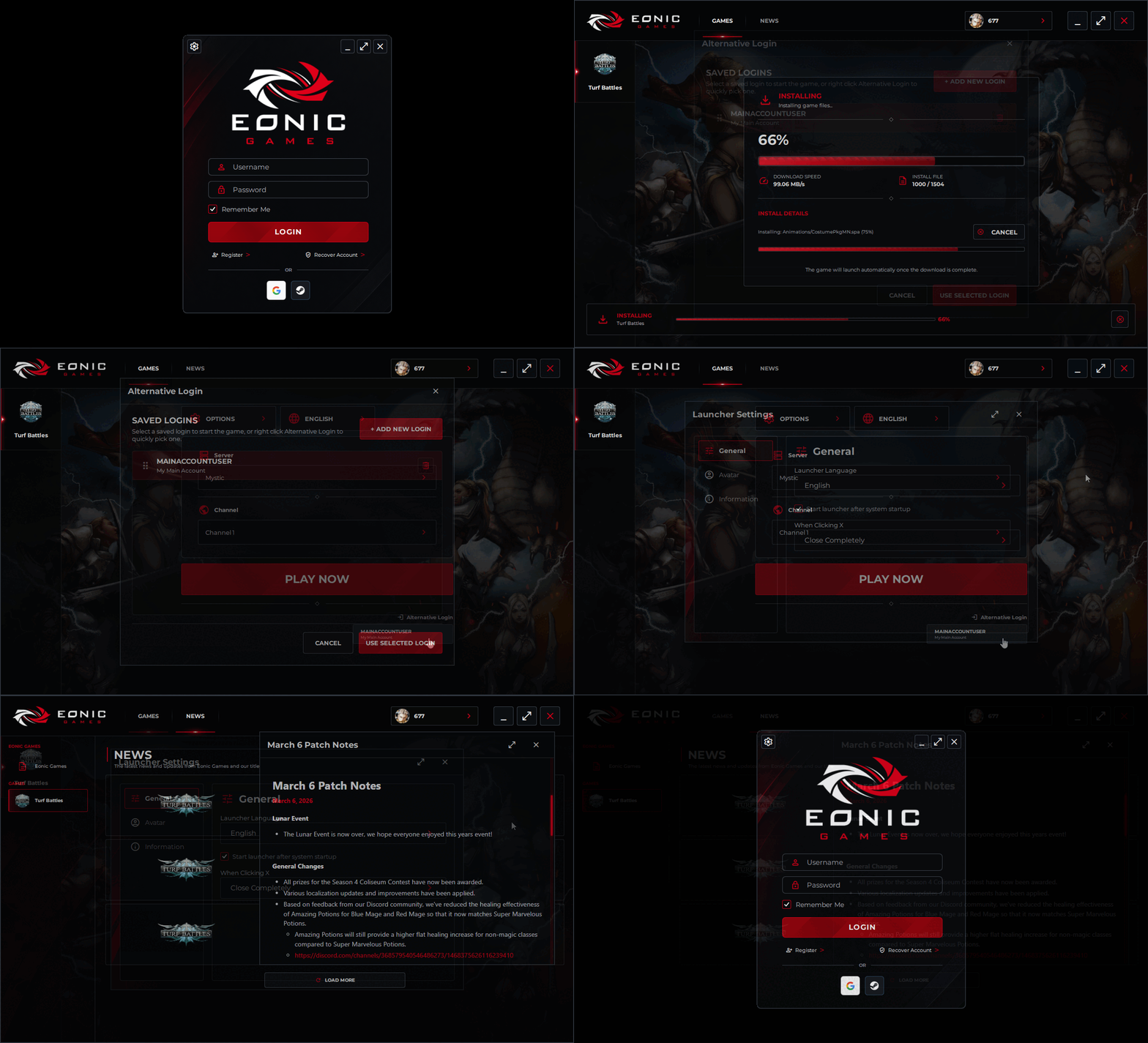
We've completely redeveloped the Eonic Games Launcher. While this project was primarily driven by the requirements needed to integrate Steam into the game's login and registration systems, it also provided an opportunity to modernize and improve nearly every aspect of the launcher experience. Some of these improvements include:
- A noticeable visual overhaul with a more modern and polished design.
- Performance and stability optimizations across nearly all launcher components.
- Full support for English, Simplified Chinese, Traditional Chinese, Korean, and Japanese.
- New Steam and Google login options directly within the launcher.
- Automatic Terms of Service presentation when updates have been made to the Terms of Service, or when users register through Steam or Google and have not previously accepted the Terms of Service.
- A completely redesigned patching system that automatically downloads, repairs, and updates the game through a network of worldwide mirrors, resulting in significantly faster download speeds for players around the globe.
- Our internal tests registered 3-10 mb/s on average with the old launcher, but with the new launcher they averaged ranges of 90-120 mb/s.
- More detailed download and patch progress information, making it easier to track installation and update progress.
- A new Alternative Logins interface, including quick account selection and configuration options.
- Numerous additional quality-of-life improvements, optimizations, security changes, and minor feature additions.
Bug Fixes
- Fixed an issue that prevented the Max Damage Indicator setting from functioning correctly.
- Using buffs and debuffs will no longer cause the mouse cursor to temporarily change to a non-targeting cursor while the skill is being cast.
- Fixed an issue that could cause Interface A to become partially or completely hidden after changing resolutions.
- Fixed an issue where certain scrollable interfaces could behave incorrectly, causing scroll positions to reset unexpectedly.
- Fixed an issue where mouse events and clicks on the Window Mode title bar could unintentionally trigger in-game actions.
- Fixed an issue where the System Chat mode in the main chat window was incorrectly limited by the number of lines visible in the floating system chat window.
- Fixed a startup crash that could occur when the game launched, sometimes causing the game to repeatedly crash during launch.
General Changes
- Quivers will now automatically equip from a players inventory (if there are any) when an Archer runs out of equipped arrows.
- Added support for custom hotkeys for the Party, Game Polls, Quests, Portals, Alerts, and Game Events interfaces.
- Made adjustments to monster aggro handling that may have been responsible for rare server crashes.
- Titles are now shared across all characters on an account. Previously, titles could only be used by the character that originally unlocked them.
- Buff Icons can now be moved/repositioned.
Game Events & Events Interface
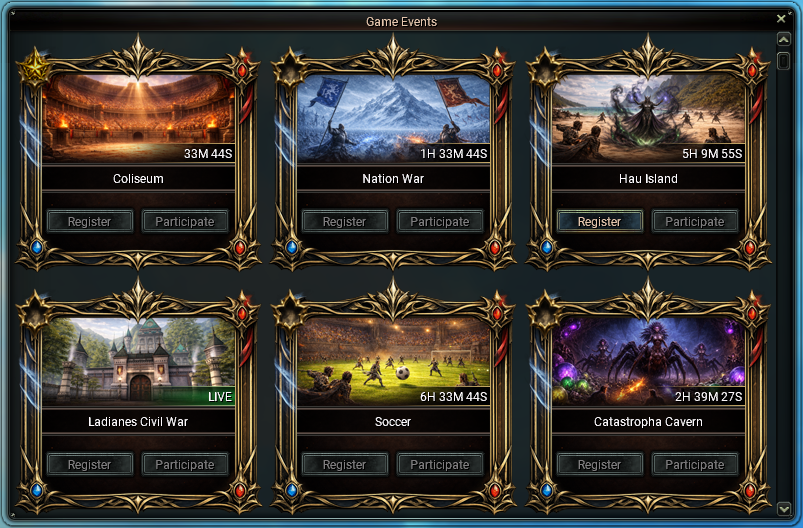
We've added a Game Events Interface designed to make it easier to track, manage, and participate in the various events available throughout the game.
- Players can view upcoming events and see exactly how long remains until an event begins.
- Events that are currently active will be clearly marked as live.
- For events that support registration and/or participation, players can use the corresponding buttons directly from the interface without needing to navigate elsewhere.
- Players can favorite up to 6 events, causing them to appear at the top of the event list for quick and convenient access.
- The default hotkey for opening the Game Events Interface is Ctrl+U.
- The Hau Event has been moved to use the same event system as the Coliseum Event.
Buff System Changes
We've completed a significant rework of the underlying Buff and Debuff system, expanding its capabilities and laying the foundation for a variety of new gameplay mechanics, balance improvements, and future set effects. The updated system now supports:
- Stackable Buffs and Debuffs
- Certain buffs and debuffs can now stack up to a maximum number of stacks.
- Buff icons will display the current number of stacks applied to your character.
- This allows effects to scale over time or through repeated actions rather than relying solely on a single static bonus.
- Caster-Specific Buffs and Debuffs
- Certain buffs and debuffs can now be configured to apply only to the player who originally cast them.
- This gives us significantly more flexibility when designing skills, set effects, and future class mechanics without unintentionally affecting party members or other players.
While these system changes are largely foundational, they will be heavily utilized in future set effect updates and balance adjustments (including a rebalancing that is planned for Season 5). These new mechanics provide us with tools that were previously unavailable, allowing us to:
- Create more unique and engaging set effects.
- Design effects that scale through active gameplay rather than simple stat increases/decreases.
- Reduce conflicts between different equipment sets and play styles.
- Address long-standing class balance issues that arose from certain set effects becoming mandatory for optimal performance.
Warehouse Improvements
- Warehouse NPCs now automatically open the Warehouse Interface when clicked. Previously, players were required to navigate through an NPC dialog and select "Open Warehouses" before accessing their warehouses.
- Double-clicking a warehouse button will now automatically open that warehouse.
- If another warehouse is already open, it will be closed and replaced by the newly selected warehouse.
- Pressing ESC will now close the currently open warehouse. If no warehouse is open, ESC will close the Warehouse Interface itself.
- Simplified several warehouse interactions, including reducing warehouse creation from two confirmation prompts down to a single prompt.
In-Game Chat Reporting
- Players can now report chat messages directly in-game by right-clicking a specific chat message and selecting "Report User".
- Reports are automatically submitted for review. If action is required, it will be taken accordingly. Please note that you will not be notified of the outcome.
- As a result, players will no longer need to submit screenshots or other evidence when reporting chat-related offenses.
- When a player is reported, they will automatically be added to your Block List for 24 hours and cannot be unblocked until that period expires.
- This change was implemented because some players were intentionally avoiding blocking users they reported in order to continue reporting additional messages from the same individual.
- Because this system now automates the reporting process, we will no longer accept chat-related reports submitted through the website.
- Players are expected to use this system responsibly. Abuse of the reporting system may result in the loss of reporting privileges and/or additional disciplinary action.
- Do not report players simply because you dislike them.
- If someone is not violating the rules, but you do not wish to communicate with them, simply block them.
- The "Block User" option is now available in the same right-click menu as "Report User".
Island & Turf Changes
- The Island Bracket system has been redesigned to once again allow level overlap between brackets. The new level ranges are:
- Bracket 1 Island: Level 40 - 90
- Bracket 2 Island: Level 90 - 120
- Bracket 3 Island: Level 120 - 160
- Bracket 4 Island: Level 160 - 200
- Bracket 5 Island: Level 200 - 275
- Tornado Turf, Ghost Castle Turf, and Catastropha Island now rotate similarly to the Island system and once again support overlapping level ranges.
- Bracket 1 Turf: Level 160 - 200
- Bracket 2 Turf: Level 200 - 275
- Bracket 3 Turf: Level 300+
- Island/Turf Crystals now display the island currently assigned to that bracket directly in the crystal's name, making it easier to identify which island/turf is active.
- Island ownership now persists through server restarts and will no longer be reset when the server is restarted.
Quest System Improvements
We've made significant improvements to the quest system, making it easier than ever to find objectives, track progress, and locate important NPCs.
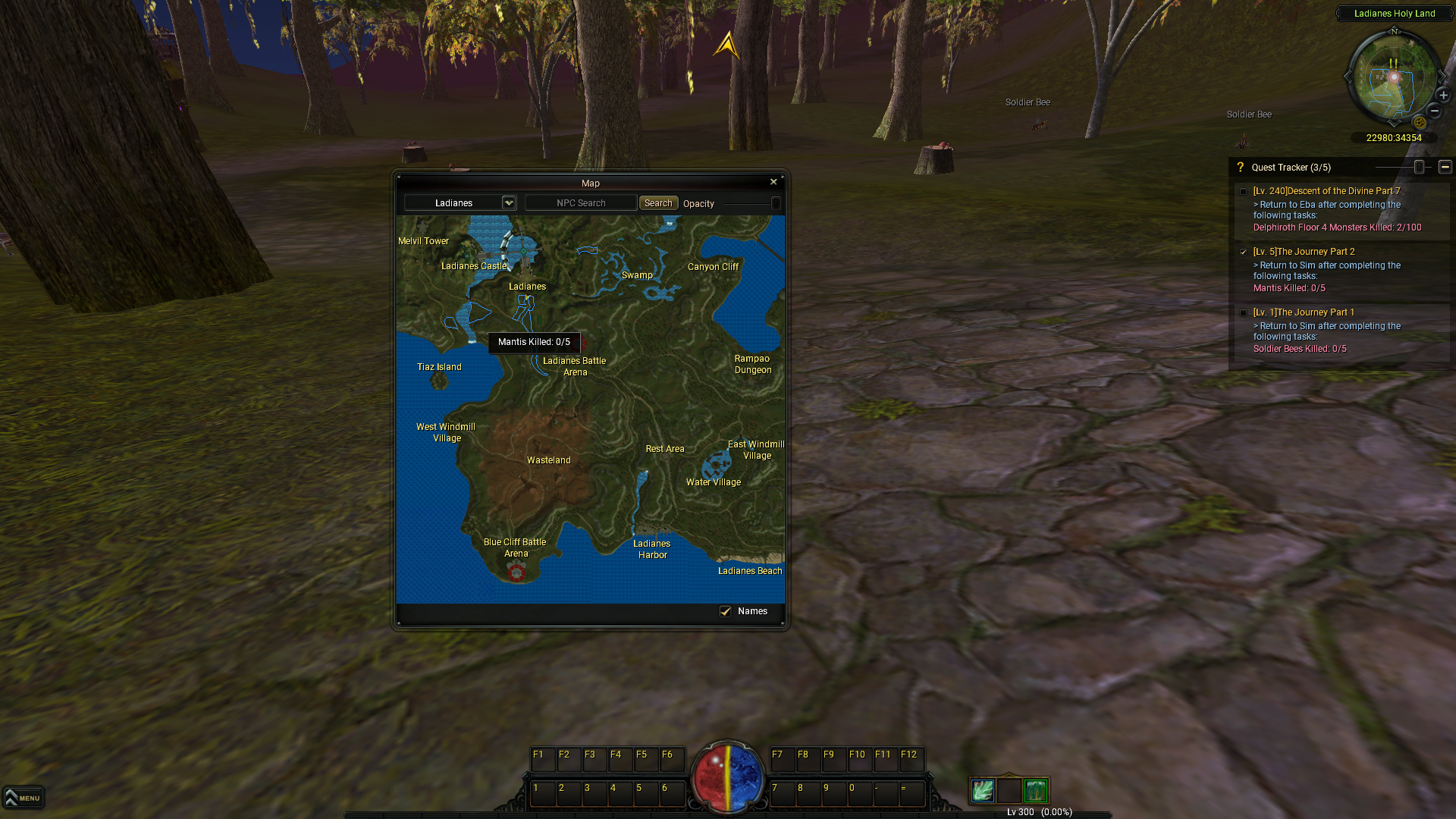
- Quest objectives now highlight relevant regions in blue on both the Mini-Map and World Map.
- Highlighted regions indicate areas where one or more monsters required for your quest can be found.
- Hovering over these areas can give you some details on what task to complete in the region.
- NPC quest icons for your currently tracked quests are now displayed on both the Mini-Map and World Map.
- Hovering over these icons will display information about the associated quest.
- The Quest Interface now includes a reward overview for each quest.
- Experience, Leni, and item rewards are only displayed when applicable.
- Item rewards are shown based on your character's class and display both the quantity and item stats you will receive.
- Experience rewards now show both the exact amount of experience granted and the percentage of your current level that the reward represents.
- Added a "Find NPC" button for quests that have not yet been started, as well as quests that require speaking to an NPC.
- This feature helps locate the NPC associated with the quest.
- Only NPCs located in areas with World Maps are supported.
Quest Tracker Improvements
The Quest Tracker has also received a variety of usability and customization improvements:
- The Quest Tracker can now be freely repositioned by dragging its title bar.
- Added a minimize button to allow tracked quests to be collapsed and expanded as needed.
- Added an opacity slider to the title bar, allowing players to adjust the background transparency of the tracker.
- Tracked quests now appear in the order they were selected, with newer selections appearing at the bottom of the list.
- Older tracked quests may be pushed out as additional quests are selected.
- This order is saved and loaded on a per-character basis.
- Added an "Active Quest" checkbox next to each tracked quest, players may designate one tracked quest as their active quest.
- An on-screen directional arrow will appear at the top of the screen, pointing toward the nearest area required to continue the current Active Quest.
- The arrow is automatically hidden when:
- The next objective is located outside the current World Map area.
- You are already within the area required to continue the quest.