Parties
Don't want to play alone? Create a party with friends or other players and progress through the game together!
Parties are essentially groups that you make with other players. Through the use of parties you can speed up not only your own leveling speed, but your party members as well.
Players are able to invite or join parties by clicking on a player and clicking the "Party" menu item on the dialog box that appears when you click a player and click on the Party menu item listed.
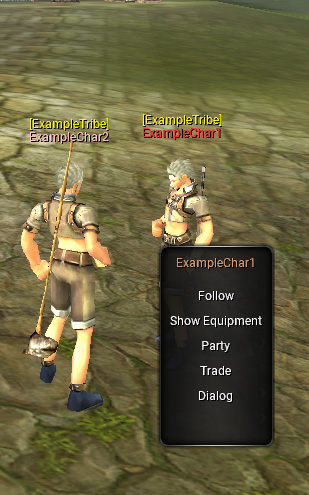
Players can also use chat commands to invite or join parties.
- "/PartyJoin PlayerName" OR "/PJoin PlayerName"
- "/PartyInvite PlayerName" OR "/PInvite PlayerName"
- In each command, PlayerName is the name of the player you are trying to invite/join.
- Remove the quotation marks around each command.
Whilst in a party, you can open the Party Window by pressing the P key on your keyboard. Through this interface you can see all your party members, their health, their names, their levels, and even their class. Party members even appear as green squares on your mini-map, so you can track their location!
Loot Modes
The party leader can change the current loot mode by clicking the treasure chest icon in the party interface, and selecting the desired loot mode. Each loot mode has its own unique loot distribution methods.
- Random: A random in-view party member gets the drops.
- Round Robin: Each in view party member will get a turn receiving loot from monsters (boss loot is tracked separately).
- Last Hit: The person who hits the monster last gets the drops.
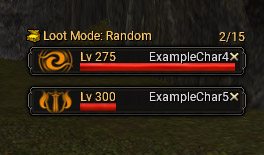
Any member in the party can request to vote kick another member from the party by clicking the X next to the player's name, the majority of the party must agree to kick a member for this to be successful. If you would like to leave a party, click the X next to your name. Remember, many monsters (bosses especially) can only be defeated (efficiently) through the use of parties. So be sure to make friends and be on the lookout for a leveling party.