User Interface
A brief synopsis of a user's main user interface.
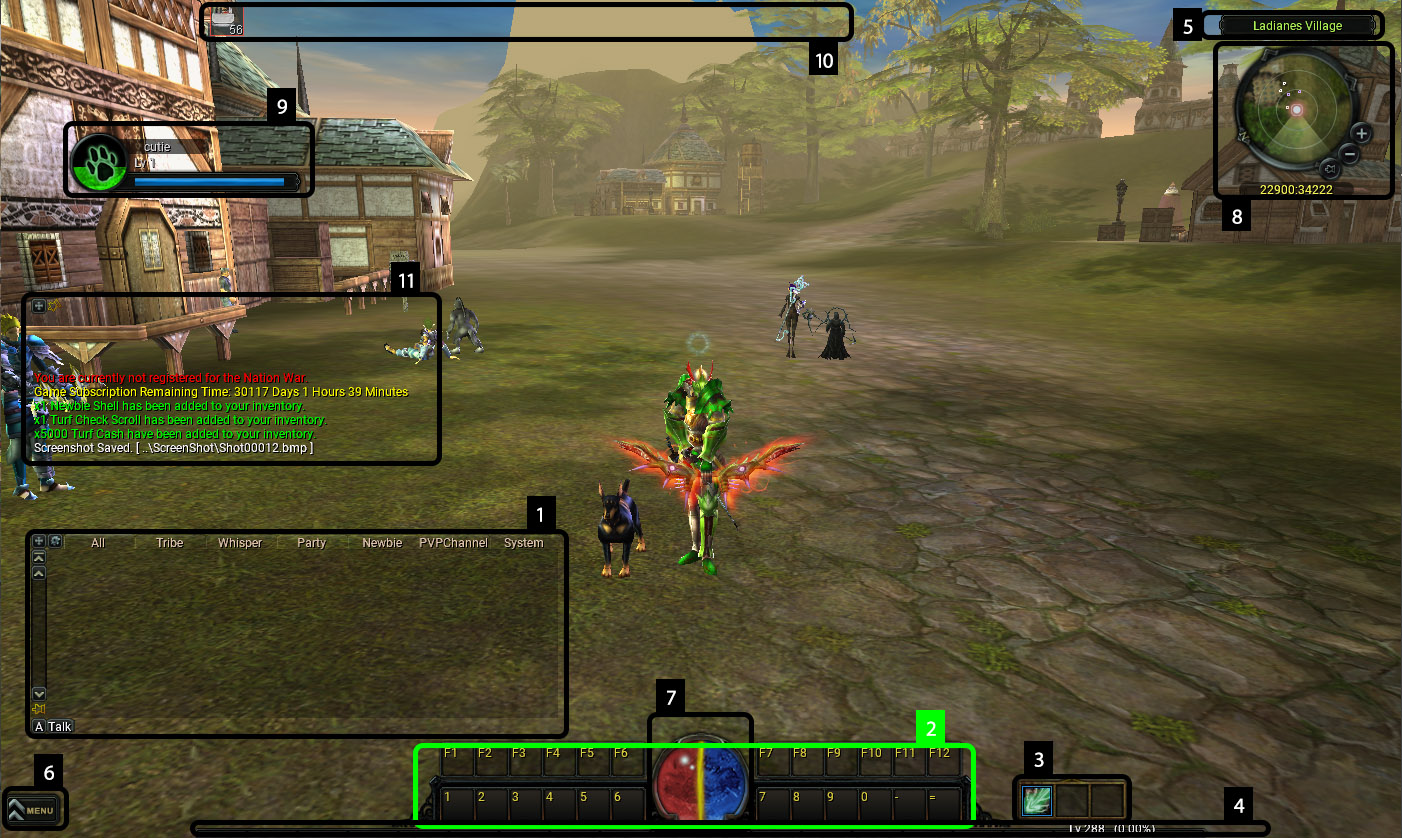
Each numbered item on the following image corresponds to the same numbered description:
- Chat Box - Will show all chat messages, up until a certain amount.
- Action Bar - Used to assign skills & some items to hotkeys ranging from 0-9 and the - & = keys.
- The up and down arrows on the right side of the Action Bar allow Subscribed users to toggle between 3 different sets of action bar loadouts!
- Active Skills - Users can place the skills they would like to use when attacking players or monsters in these slots.
- The blue box (first from the left) can have basic physical or arrow based attacks placed on it.
- The red box (second from the left) can have finisher based physical attacks placed on it.
- The green box (third from the left) can have magic or spirit based attacks placed on it.
- EXP Bar - Shows your current experience percentage and player level. The bar will fill with orange as you gain more experience.
- Zone Information - Provides you with the name of your current area.
- Menu Button - Used to open up a menu to different interfaces.
- Status Orb - Provides you with real time values for your Stamina, Health, and Mana.
- Stamina: This is the yellow/orange curved bar. Stamina is required to continue running. If you run out of stamina, you will automatically start walking.
- Health: This is the red, half orb.
- Mana: This is the blue, half orb. Mana is required for magic or spirit based skills.
- Mini-Map - A top down representation of your current location on the mini-map. The mini-map will show other interactable actors with different colors.
- Pet Icon - When you have a pet summoned, you may have its pet icon displaying, the green color inside the orb shows how much experience your pet has, the more green it is, the closer your pet is to levelling. The long blue bar, is the hunger level, it depletes and changes color based on how hungry your pet is.
- Active Buffs - Shows a complete list of all your currently active buffs, as well as their remaining times.
- System Messages - System messages appear here, such as announcements, or when turfs are taken, or actions taken by your subscription, such as auto material pickup.